























































The Haptic Revolution: How to Unlock Advanced Notification Vibrations on Any Android Device

In the rapidly evolving ecosystem of mobile technology, small, seemingly minor features often dictate the difference between a device that merely functions and one that truly integrates into a user’s workflow. The latest iteration of Google’s hardware, the Pixel 11 series, introduced a sophisticated, albeit low-profile, feature: the ability to assign distinctive vibration patterns to specific notification categories.
While this addition has been hailed as a significant leap in "at-a-glance" (or rather, "in-the-pocket") awareness, it is currently locked behind the walls of Google’s latest hardware. However, for the Android power-user community, such exclusivity is merely an invitation to innovate. By leveraging third-party automation tools, users of any Android device—regardless of manufacturer or age—can replicate and even exceed the functionality of the Pixel 11’s vibration system.
Main Facts: The New Standard in Notification Awareness
The core value proposition of the Pixel 11’s new haptic settings is contextual awareness. By assigning unique vibration patterns—such as the rhythmic "Heartbeat," the staccato "Bumps," or the fluid "Swirl"—to specific alerts, users can discern the priority and nature of an incoming communication without ever glancing at their screen.

This is more than a novelty; it is a profound accessibility and productivity feature. In professional settings, a user can instantly distinguish between a high-priority Slack mention from a manager and a routine notification from a social media application. This physical feedback loop reduces "phone checking" fatigue, allowing users to remain present in physical environments while staying informed of critical digital developments.
Chronology: From Pixel Exclusivity to Universal Customization
The rollout of these haptic features began with the launch of the Pixel 11, marking a shift in how Google approaches notification management.
- The Pixel 11 Launch: Google integrated system-level haptic customization, allowing users to toggle through pre-set vibration styles.
- The "Wait-and-See" Period: Shortly after launch, the tech community began speculating whether this feature would be back-ported to older Pixel devices or integrated into the core Android Open Source Project (AOSP). As of today, no official timeline for such a rollout exists.
- The Power-User Intervention: Recognizing the demand for this functionality, power users turned to automation platforms like BuzzKill to bridge the gap. By moving away from system-dependent settings, users found they could bypass hardware limitations entirely, turning the "exclusive" feature into a universal capability.
Supporting Data: Why Custom Vibrations Matter
Haptic feedback is a psychological tool. Studies on human-computer interaction have long suggested that tactile cues are processed faster by the brain than visual or auditory ones.

- Reduction in Cognitive Load: When a user hears a notification sound, the brain must categorize the sound and assign it a priority level. A vibration pattern, however, is felt, bypassing the auditory processing center.
- Privacy and Discretion: In meetings or public transit, audible pings are intrusive. Custom vibrations allow for a "silent language" between the user and their device.
- The "Trent" Factor: As many users have noted, the ability to mute or dampen vibrations for non-essential notifications (or specific recurring senders, like the hypothetical "Trent") is a significant boost to daily productivity and mental clarity.
Implementation: A Four-Minute Guide to Haptic Freedom
You do not need a new device to achieve this level of control. The application BuzzKill serves as a powerful filtering engine for Android notifications. Here is how to configure your own custom vibration sequences in under four minutes.
Step 1: Defining the Trigger
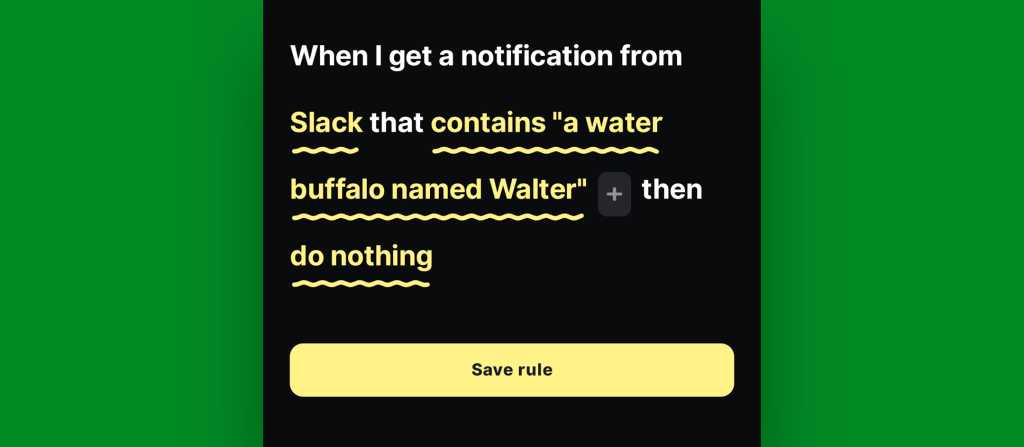
Open BuzzKill and select the "Add Rule" function. Choose the specific application you wish to target. You can refine this by using the "Contains" field to trigger the rule only when specific keywords or names appear, ensuring that you aren’t interrupted by mundane messages.
Step 2: Selecting the "Custom Alert" Action
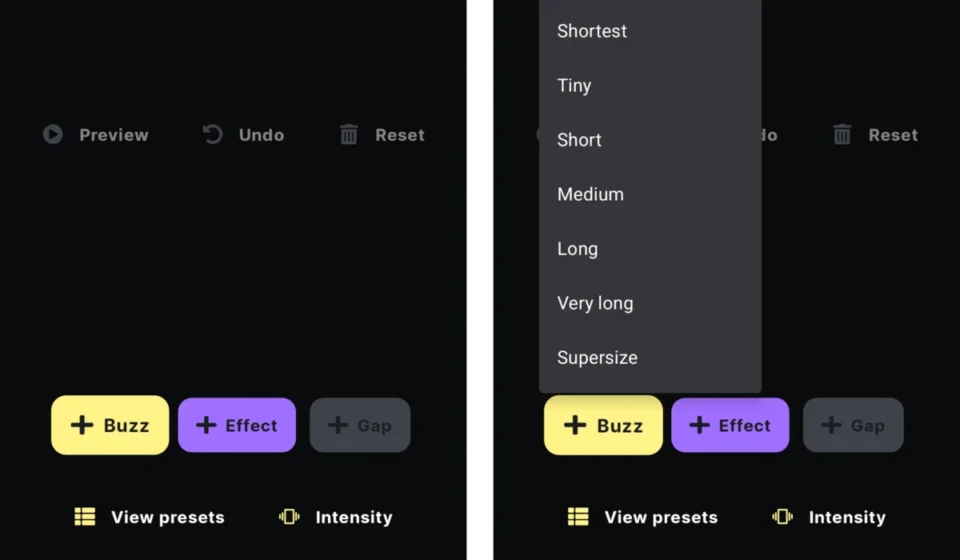
Instead of the default notification behavior, tap "Do Nothing" and navigate to "Custom Alert." This is the command center for your haptic configuration. By selecting "Pick Action," you unlock the ability to define the pulse and duration of your device’s motor.

Step 3: Designing the Pattern
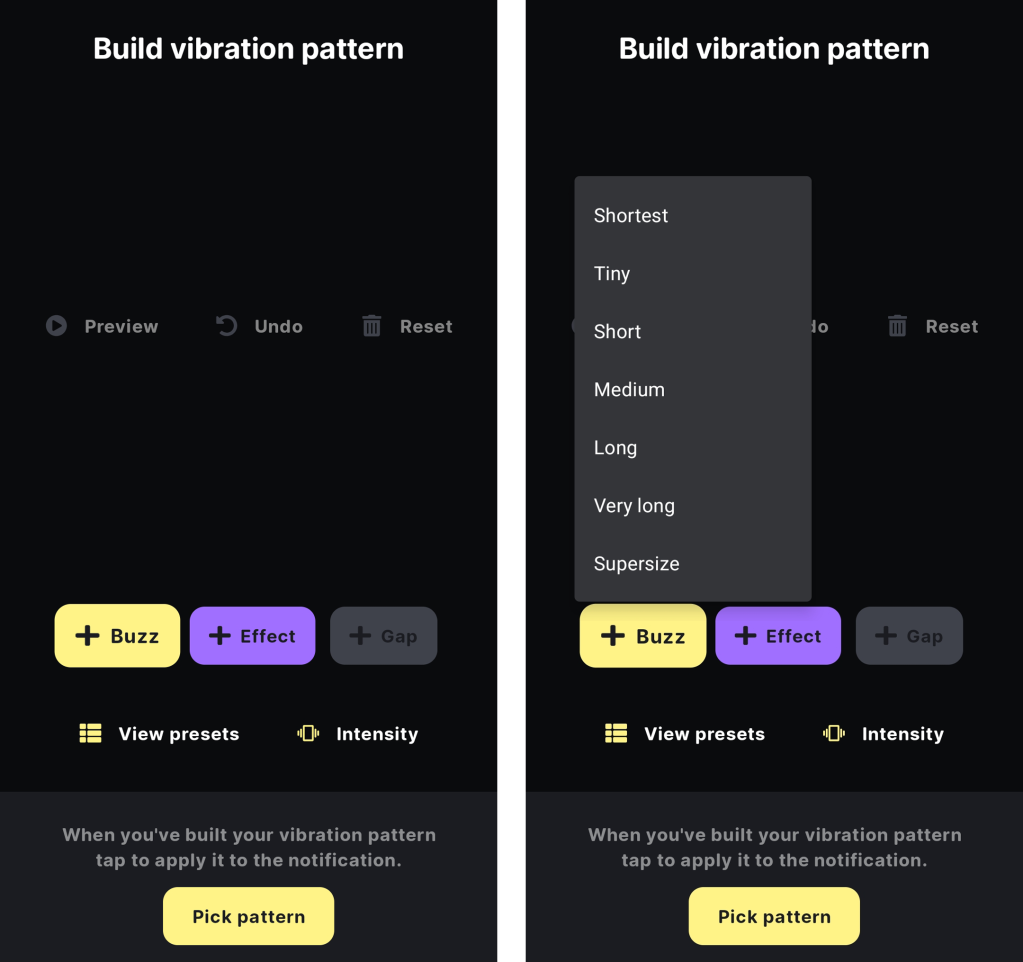
This is where the true customization happens. Unlike the preset options on the Pixel 11, BuzzKill allows you to chain together specific durations of "Buzz" and "Gap." You can create a complex sequence—perhaps a long-short-long pattern for high-priority emails or a rapid-fire sequence for immediate emergency alerts. You can also adjust the "Intensity," allowing for gentle reminders versus attention-grabbing pulses.
Step 4: Testing and Activation
Always utilize the "Preview" button before saving. This allows you to feel the pattern in real-time. Once you are satisfied with the tactile signature, save the rule. You can repeat this process for any app, creating a library of vibrations that act as a personal code for your digital life.
Implications: The Future of Android Personalization
The fact that an app can replicate a "flagship" feature so seamlessly speaks to the core philosophy of Android: user sovereignty. While Google’s move to include these features in the Pixel 11 is a welcome step toward a more refined user experience, the reliance on third-party tools like BuzzKill highlights that the true power of Android lies in its flexibility.
Looking forward, we can expect manufacturers to continue integrating granular haptic controls into their skins. However, until these features become a standard part of the AOSP, users who seek to customize their experience will continue to rely on the vibrant developer ecosystem that makes Android the most versatile mobile platform on the market.
A Note on Privacy and System Resources
It is worth noting that while these tools are powerful, they require notification access permissions. Users should always ensure they are using reputable applications from trusted developers. The minimal impact on battery life and system resources is a testament to the efficiency of modern notification filtering, but transparency in permissions is the cornerstone of responsible power-user practices.
Conclusion: Take Control of Your Pocket
Technology should serve the user, not the other way around. By taking just a few minutes to configure your vibration patterns, you are not just customizing a phone—you are optimizing how you interact with the world. Whether you are avoiding the "Trent" notifications of the world or prioritizing messages from loved ones, the power to define your own alerts is a small but mighty victory for digital autonomy.
Stay tuned for further updates on Android customization, and remember: in the world of mobile tech, if you can imagine a workflow, there is almost certainly a way to build it.