
























































Elevating the Mobile Experience: Five Essential Browser Extensions for Android Power Users

In the contemporary digital landscape, the mobile web remains a paradox: it is our primary gateway to information, yet it is often plagued by cluttered interfaces, intrusive paywalls, and suboptimal media handling. While mobile browsers like Chrome and Vivaldi have made significant strides in performance, they frequently lack the granular control that desktop users have long taken for granted.
However, a niche category of browser extensions—when utilized through compatible platforms like Vivaldi for Android—can fundamentally transform your mobile browsing experience. By moving beyond the limitations of default mobile interfaces, users can reclaim their screen real estate, bypass unnecessary barriers, and streamline their daily digital interactions.
The Core Problem: Why Mobile Browsing Needs an Upgrade
The evolution of the mobile web has been driven by advertising, engagement metrics, and rigid design standards that often prioritize the platform over the user. For the average smartphone owner, this results in "interface fatigue"—a state where the actual content is buried under floating navigation bars, pop-up video players, and obstructive layout elements.
While many users are aware that extensions are a staple of the desktop experience, there is a persistent, erroneous belief that mobile browsing is a "read-only" environment. In reality, power users leveraging browsers that support Chromium-based extensions can achieve a level of customization previously reserved for PC workstations.

1. Click to Remove Element: Reclaiming Your Screen Real Estate
The web is not one-size-fits-all, yet mobile sites often force a monolithic layout upon every visitor. Click to Remove Element serves as a surgical tool for the modern web, allowing users to strip away the digital "noise" that distracts from their primary objective.
Functionality and Impact
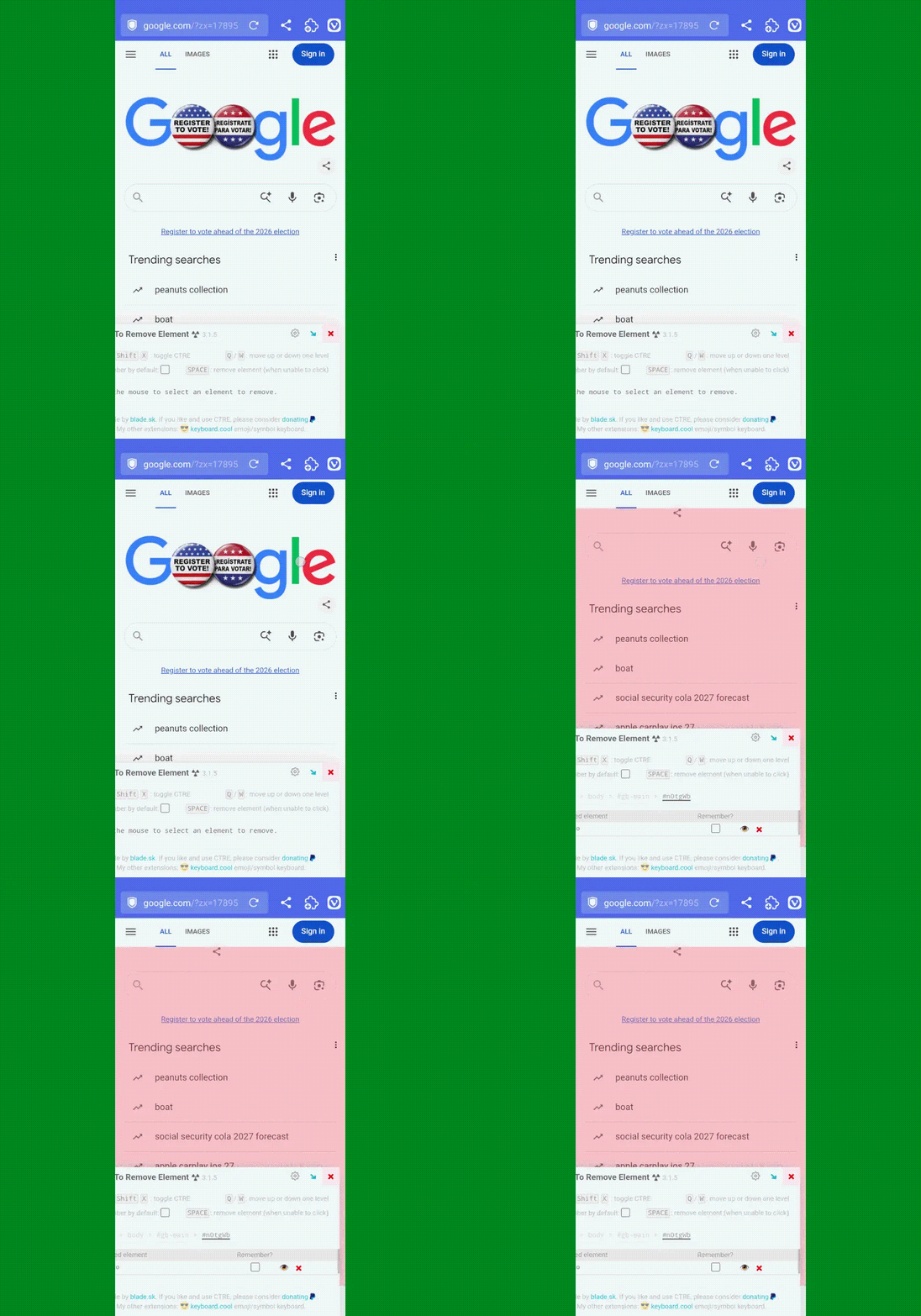
Unlike traditional ad-blockers that target specific scripts, this extension allows for manual, selective pruning of any DOM (Document Object Model) element. Whether it is a redundant logo, a persistent footer, or an intrusive newsletter sign-up modal, the process is straightforward:
- Activate the extension from your menu.
- Select the offending element on the page.
- Watch as the layout instantly reflows to fill the gap.
The "Persistent" Advantage
Perhaps the most significant feature is the "Remember" functionality. By checking the persistence box, the extension stores a local instruction to hide that specific element on subsequent visits. This effectively transforms your favorite news sites or back-end interfaces into custom-tailored environments, significantly reducing cognitive load.
2. Archive Page: Navigating the Paywall Dilemma
The current economic model of digital journalism presents a unique challenge: balancing the need for sustainable publication funding with the user’s desire for ad-hoc access. While supporting quality journalism via subscriptions is encouraged, there are legitimate use cases—research, verification, and sharing—where a permanent, static view of an article is necessary.

The Mechanism of Access
Archive Page leverages the power of Archive Today, a service designed to capture and index snapshots of live web pages. By integrating this into your mobile browser, you bridge the gap between ephemeral web content and permanent, shareable documentation.
Ethical Considerations
It is critical to utilize such tools with discretion. While they provide an essential utility for accessing information that may otherwise be restricted by complex, shifting paywalls, they should not replace a subscription to outlets that provide value to your professional or personal life. As a tool for research, however, it remains an indispensable utility for maintaining a reliable library of references.
3. Keepa: The Strategic Advantage for Amazon Shoppers
Mobile e-commerce is often a game of impulse and timing. Amazon’s interface is designed to emphasize "Buy Now" buttons, often obscuring the fact that a product’s price may be at a historical peak. Keepa acts as a silent, intelligent partner in the shopping process.
Historical Price Intelligence
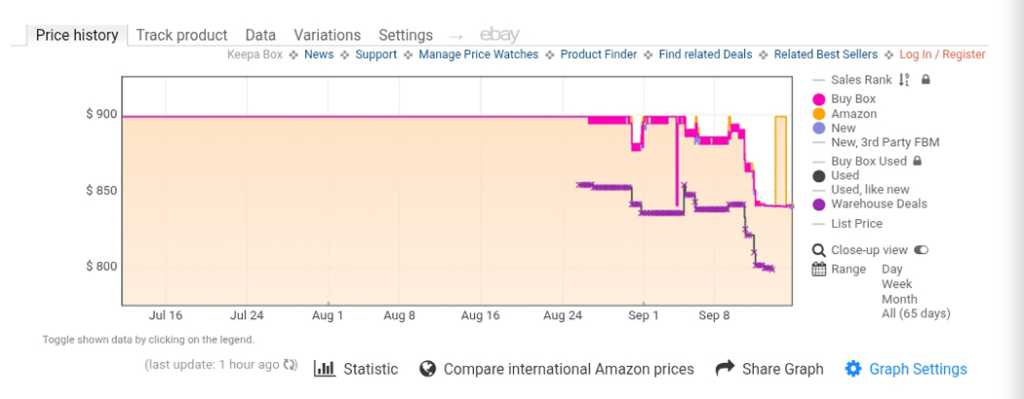
Once installed, Keepa unobtrusively injects a price history graph directly into the Amazon mobile interface. This data allows users to distinguish between an actual sale and a "discounted" price that has been artificially inflated.
- Data Insight: By viewing the volatility of a product’s price over 30, 90, or 360 days, consumers can make informed decisions about whether to purchase immediately or set a tracking alert for when the price inevitably dips.
- Seamless Integration: Because it lives natively within the browser tab, there is no need to switch between apps or copy-paste URLs into third-party trackers.
4. Save Image As Type: Solving the Multimedia Format Crisis
Modern web development often prioritizes high-efficiency formats like WebP or AVIF. While these formats are excellent for data savings and load times, they are frequently incompatible with legacy desktop software, specific image editors, or messaging platforms that require standard JPEGs or PNGs.
Removing the Conversion Bottleneck
Previously, saving a non-standard image required downloading the file, opening a secondary conversion app, and manually exporting it. Save Image As Type collapses this workflow. By adding a context-aware option to the long-press menu, users can now choose the desired file format—and even the compression quality—at the point of origin. This represents a massive time-saver for content creators, social media managers, and researchers who frequently handle high volumes of visual assets on the go.
5. Wikiwand: Modernizing the World’s Knowledge Base
Wikipedia is arguably the most important information resource on the planet, yet its interface has remained largely static for decades. While functional, it is not optimized for modern high-resolution mobile displays. Wikiwand serves as a complete UI/UX overhaul for the platform.
Enhanced Readability
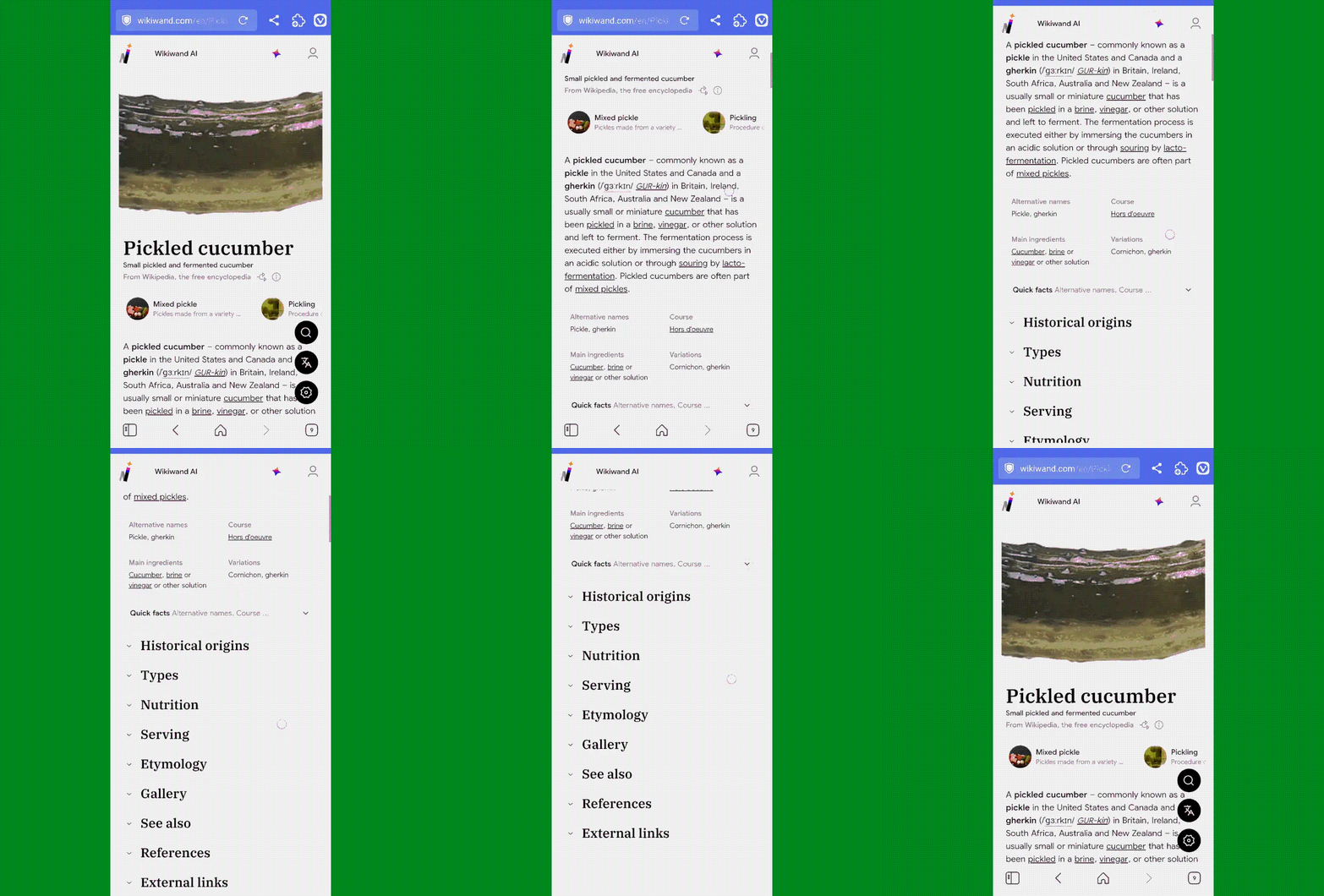
Wikiwand wraps the existing Wikipedia database in a modernized, aesthetically pleasing skin. Features include:
- Improved Typography: Optimized line spacing and font choices for better readability.
- Fixed Navigation: A persistent table of contents that allows for effortless jumping between sections on long articles.
- Media Gallery: A more engaging way to view images and infographics embedded within entries.
For the heavy researcher, this transformation makes long-form reading sessions on Wikipedia significantly less fatiguing, turning a utilitarian task into a pleasant experience.
Implications for the Future of Mobile Computing
The transition of these tools to the mobile browser ecosystem signifies a shift in power. No longer are users forced to accept the constraints of "mobile-optimized" versions of the web. By adopting these extensions, users are effectively "desktop-izing" their mobile experience, turning their smartphones into more capable, productive workstations.
As mobile browsers continue to evolve, the distinction between a "mobile experience" and a "desktop experience" will continue to blur. For now, these five extensions provide the best roadmap for those looking to exert control over their digital environment.
By strategically selecting tools that address specific pain points—be it visual clutter, paywall friction, or format incompatibility—users can craft a browsing experience that is not only faster but fundamentally more aligned with their individual needs. In an era where digital attention is the most valuable currency, these extensions are the tools that ensure you are the one in control of how you spend it.