





















































Losing access to a primary Google account is, for many, the equivalent of a modern-day digital catastrophe. In an era where a single sign-in acts as the master key to an entire ecosystem—spanning Android device settings, sensitive email correspondence, decades of photographs in Google Photos, professional documentation in Drive, and even granular location history in Maps—the loss of that account is not merely an inconvenience; it is a profound disruption of one’s digital existence.
As Google continues to expand its security infrastructure, it has introduced a feature that functions as a final, emergency fail-safe: the "Selfie Sign-in." While the name might sound informal, the technology represents a sophisticated attempt to bridge the gap between human identity and automated account recovery.
Main Facts: What is Selfie Sign-in?
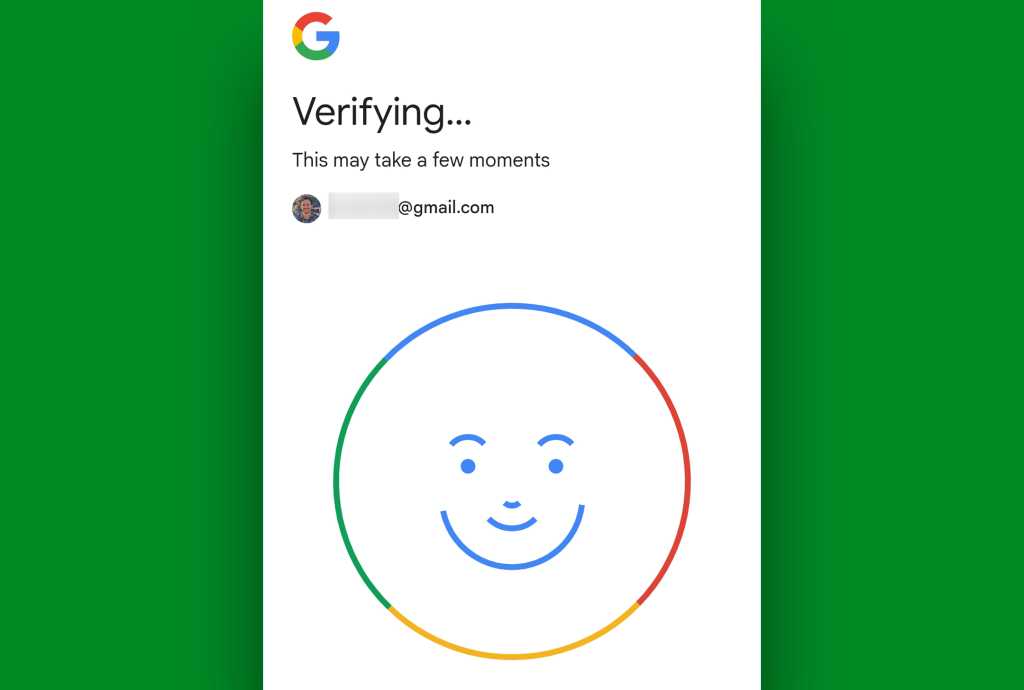
Google’s latest security initiative, often referred to as "Selfie for sign-in" or "Video verification," is a biometric recovery mechanism designed to assist users who have exhausted all other means of accessing their accounts.
Unlike biometric features integrated into hardware—such as FaceID on an iPhone or the face-unlock features found on many Android handsets—this system is strictly account-bound. It does not unlock your device; it unlocks your identity within Google’s servers.

The mechanism is simple in practice but complex in execution:
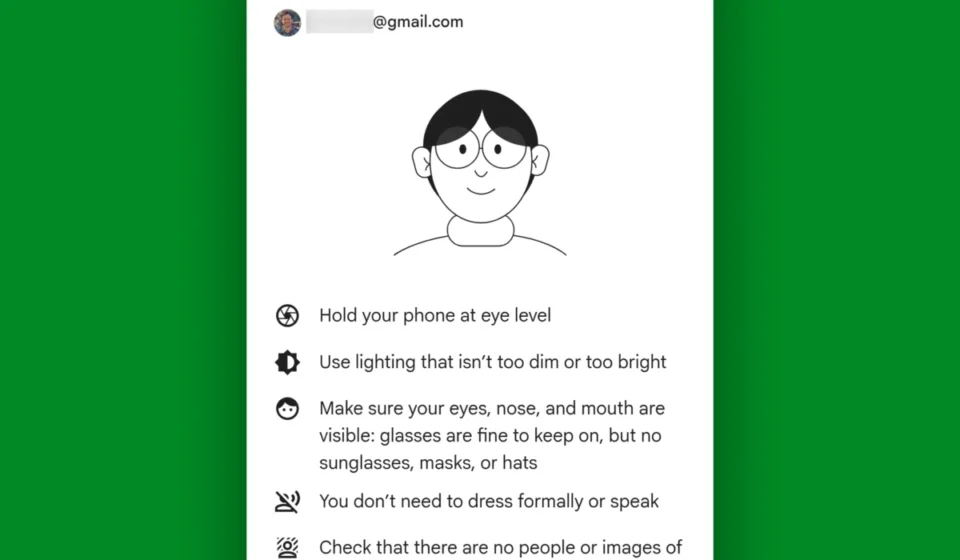
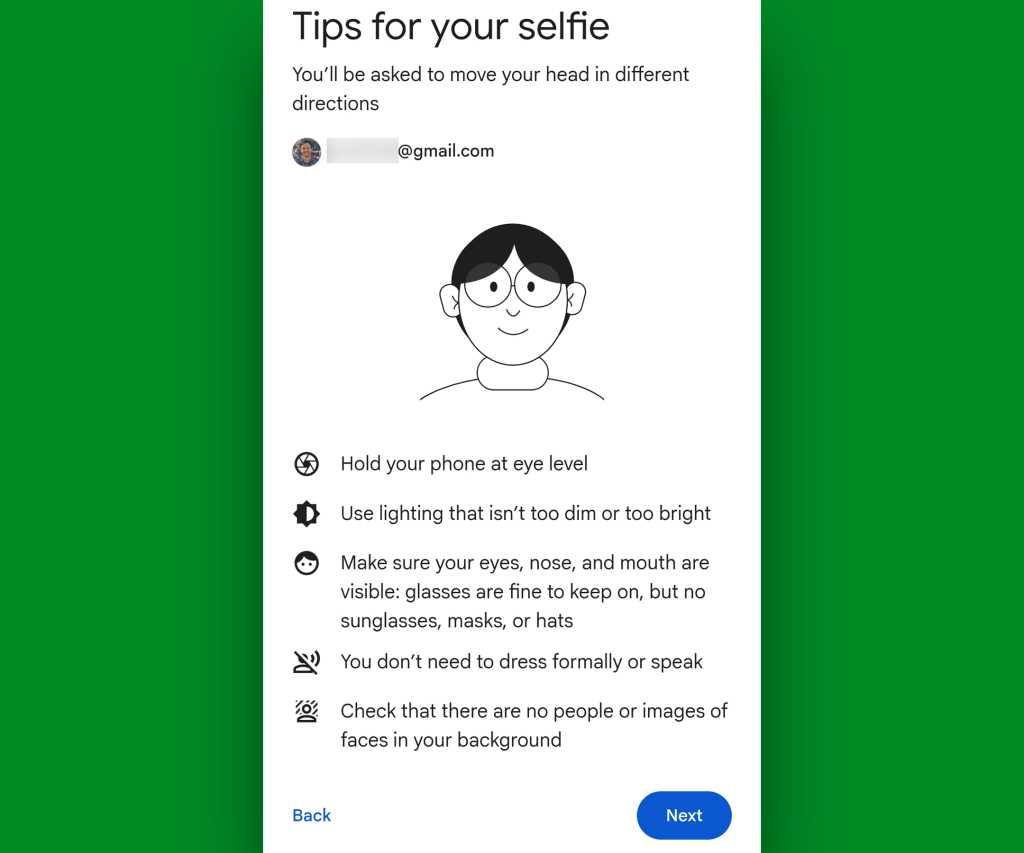
- Enrollment: Users record a short, guided video clip of their face, moving their head in specific directions to create a unique, three-dimensional biometric profile.
- Encryption: This data is stored in an encrypted format, both in transit and at rest, ensuring that the visual representation of the user remains protected from unauthorized interception.
- Emergency Activation: If a user finds themselves locked out of their account due to forgotten passwords, lost two-factor authentication devices, or a compromised security state, they can initiate a "video verification" process. They must record a new, live video that matches the specific movements and features of the stored profile.
Chronology: The Evolution of Google Account Security
The trajectory of Google’s security measures has been a steady march toward eliminating reliance on vulnerable, static passwords.
- The Era of Passwords (Pre-2010s): For years, the security of a user’s account rested almost entirely on the complexity of their password and the user’s ability to keep it secret.
- The 2FA Revolution: Recognizing the flaws in password-only security, Google introduced Multi-Factor Authentication (MFA), pushing users toward SMS codes, authenticator apps, and eventually, hardware security keys.
- The Passkey Paradigm (2023-2024): Google shifted the industry standard toward "Passkeys," which allow users to sign in using the same biometric locks they use for their phones, effectively removing the need for a typed password.
- The Selfie-Verification Rollout (Late 2024–Present): With the introduction of the selfie-verification system, Google has addressed the "last-mile" problem: what happens when the passkeys, recovery phones, and security keys all fail or become inaccessible? This feature serves as the final barrier between a user and total account loss.
Supporting Data and Technical Nuance
The technical architecture of this feature prioritizes both speed and privacy. To ensure that the system cannot be bypassed by a photograph or a static video—a process known as "liveness detection"—the verification prompt requires users to move their heads in random, specific directions.
Privacy Controls
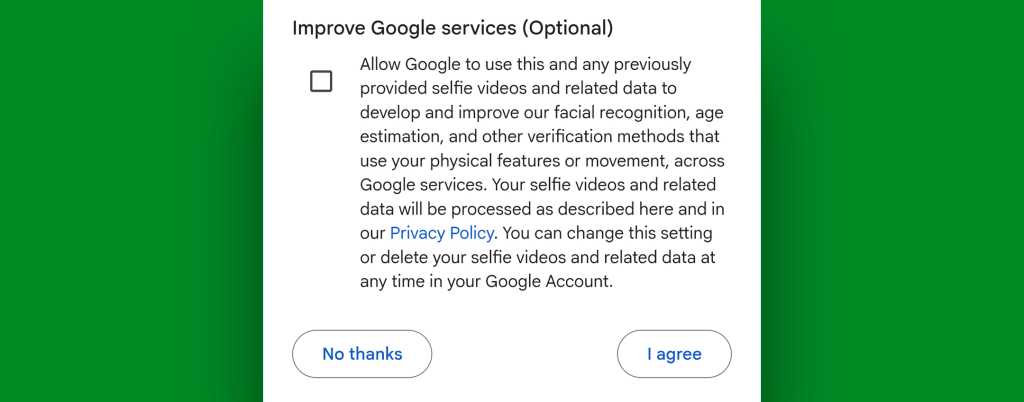
A primary concern for users is how this data is utilized. During the setup process, users are presented with an option labeled "Improve Google services."
- Opt-in vs. Opt-out: If a user selects this option, their anonymized biometric data may be used to train Google’s facial recognition and AI models.
- Total Privacy: If the user leaves this box unchecked, Google explicitly commits to using the stored video data only for the purpose of identity verification.
- Data Lifecycle: Users retain full control over their biometric footprint. At any point, the saved video can be deleted via the Google account security settings page, effectively removing the biometric recovery method from their account.
Limitations and Exclusions
The system is currently limited in scope. It is not available for Google Workspace (enterprise or educational) accounts, as these organizations possess administrative protocols for account recovery. Furthermore, users who have enrolled in Google’s "Advanced Protection Program"—a high-security tier designed for journalists, activists, and those at high risk of targeted attacks—are ineligible for this feature. This exclusion exists because the Advanced Protection Program intentionally removes "easy" recovery paths to prevent social engineering attacks.
Official Responses and Strategic Rationale
Google’s public stance on this feature, shared through various engineering blog posts, frames it as a "lifesaver." The company acknowledges that while users are increasingly adopting robust security measures, the human element—forgetting a backup code or losing a security key—remains a point of failure.
By providing a biometric fallback, Google is essentially creating an "identity anchor." Unlike a password that can be stolen or an email address that can be compromised, a user’s face is a unique biological constant. By tying this to the account, Google can verify the user’s identity through a high-confidence biometric match, even in the absence of traditional credentials.
Implications for the Modern User
The emergence of selfie-verification has significant implications for how we perceive our digital identities.
1. The Shift to Biological Identity
We are witnessing a transition where our bodies are becoming our primary security credentials. While this offers convenience and a higher degree of security against brute-force attacks, it also centralizes a great deal of power in the hands of the corporations that manage this biometric data. Users must weigh the convenience of a "never-locked-out" state against the reality that their biological likeness is being processed by algorithms.
2. A Call for Proactive Management
The "Selfie Sign-in" is not a substitute for standard security hygiene. It is a secondary recovery mechanism. Users are still strongly encouraged to:
- Maintain updated recovery information: Keep phone numbers and backup email addresses current.
- Diversify recovery methods: Use a mix of hardware keys, authenticator apps, and now, the selfie verification.
- Understand Account Settings: The most secure users are those who periodically audit their account security page. Knowing where the "delete biometric data" button is located is just as important as knowing how to enable the feature.
3. The Human Element of Security
The biggest risk to modern accounts is no longer the "hacker in a hoodie" trying to crack a password, but rather the user who finds themselves in a situation where they cannot prove they are who they say they are. By enabling selfie verification, you are essentially "registering your face" with the gatekeeper of your digital life.
Conclusion: Is It Worth Enabling?
For the average consumer, the benefits of enabling selfie verification far outweigh the risks, provided the user remains conscious of the privacy settings. It acts as an insurance policy against the "modern-day nightmare" of total digital lockout.
As the digital landscape becomes more complex, the tools we use to navigate it must also become more sophisticated. Whether we like it or not, the era of relying solely on a password is over. Embracing these biometric advancements is not just a trend; it is a necessity for anyone whose life, career, and memories are housed within the Google cloud.
Before you decide to ignore this feature, take the two minutes required to set it up. It is a small investment of time that could prove to be the most valuable insurance policy you ever sign. Remember: you are not just securing an account; you are securing the access point to your digital identity. Ensure that when you reach the gate, you have every key possible to open it.