



























































In the modern digital landscape, the web browser has evolved from a simple window for viewing pages into the primary operating system for the global workforce. Whether you are drafting documents in cloud-based suites, managing project boards, or navigating complex communication hubs, the browser is where your professional life happens. Yet, while desktop operating systems like Windows and macOS have spent decades refining their efficiency, browsers have largely remained static—often prioritizing interface aesthetics and AI-driven fluff over the foundational utility required by power users.
As tech giants scramble to integrate generative AI into every corner of the digital experience, many professionals are finding that the most effective productivity gains aren’t found in a chatbot prompt, but in the raw efficiency of their own workflows. Enter Tab-da, a sophisticated new browser extension designed to reclaim your browser through high-speed, keyboard-centric navigation.
The Shift Toward "Desktop-Class" Browsing
For years, the browser has suffered from a fundamental identity crisis: it acts like an operating system but lacks the management tools of one. We live in a world of dozens of open tabs, scattered across multiple windows, requiring a constant, tedious reliance on the mouse to switch contexts. This "mouse-heavy" workflow introduces micro-friction—the split second it takes to find a cursor, move it to a tab, and click. Multiplied by hundreds of interactions throughout a workday, this friction accumulates into significant cognitive fatigue.
While browser developers have focused on cramming proprietary AI tools like Google’s Gemini into the sidebar, independent developers are identifying a more pressing void: the need for keyboard-first management. Tab-da, created by developer Bardi Golriz, is built to bridge this gap. By turning your browser into a command-line-inspired workspace, it shifts the burden of navigation from the erratic, imprecise mouse to the consistent, high-speed precision of the keyboard.

Chronology of a Productivity Breakthrough
The development of Tab-da follows a growing trend in software design known as "command-palette-driven" navigation. This design philosophy—famously popularized by productivity tools like Alfred, Raycast, and Notion—centers on a singular interface where the user triggers a command and types a natural language query to perform an action.
- Early 2024: Developer Bardi Golriz, known for his minimalist, high-utility tools like the Ruff suite of writing and note-taking apps, begins prototyping a way to bring system-level keyboard shortcuts to Chromium browsers.
- Mid-2024: Initial builds are tested within the developer community to ensure compatibility across the Chromium ecosystem, including Chrome, Brave, Edge, and Vivaldi.
- August 2026: The official public release of Tab-da, positioning itself as a "keyboard-centric kick-in-the-keister" for browsers that have become bloated and cumbersome.
- Present Day: The tool has moved from a niche developer curiosity to a staple for power users seeking to reduce their "mouse-miles" and streamline complex multitasking environments.
Supporting Data: The Case for Keyboard Shortcuts
The efficiency gains provided by keyboard-first tools are not merely subjective; they are supported by principles of human-computer interaction (HCI). Research into user interface design suggests that "modal" navigation—where users must physically move a peripheral device to click on UI elements—is significantly slower than "shortcut-driven" navigation.
According to productivity studies, the average knowledge worker spends nearly 20% of their time simply managing the browser interface—searching for tabs, organizing windows, and switching between web applications. By utilizing a system like Tab-da, which maps these actions to specific, repeatable keystrokes, users can reduce the cognitive load associated with navigation.
Furthermore, the "muscle memory" effect is a powerful multiplier. Once a shortcut becomes instinctual, the user no longer has to visually scan the screen to find the correct icon. They simply execute the command, allowing their brain to remain focused on the task—writing, coding, or analyzing—rather than the tool.
The Core Command Architecture
Tab-da operates through three primary pillars, each designed to strip away the unnecessary UI layers that typically bog down browser performance.
1. The OS-Level Tab Switcher
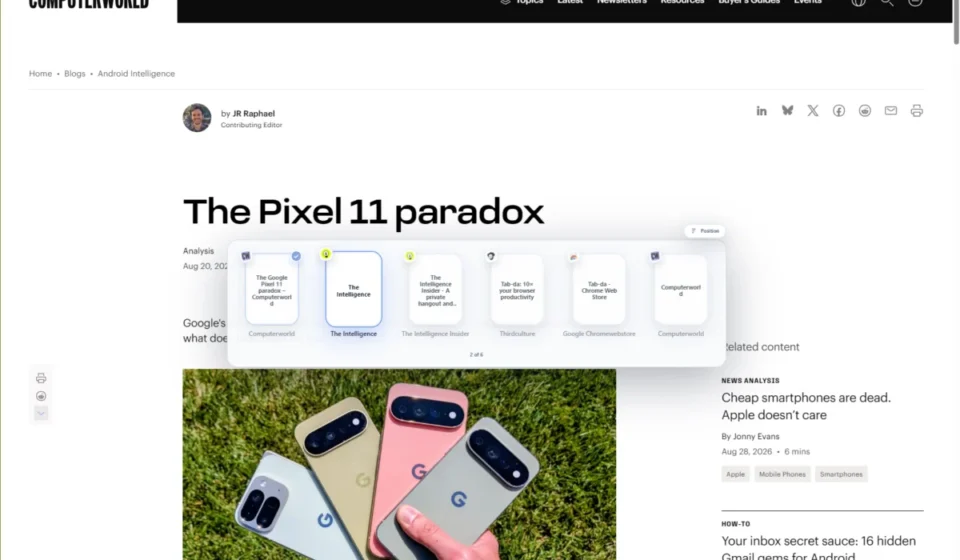
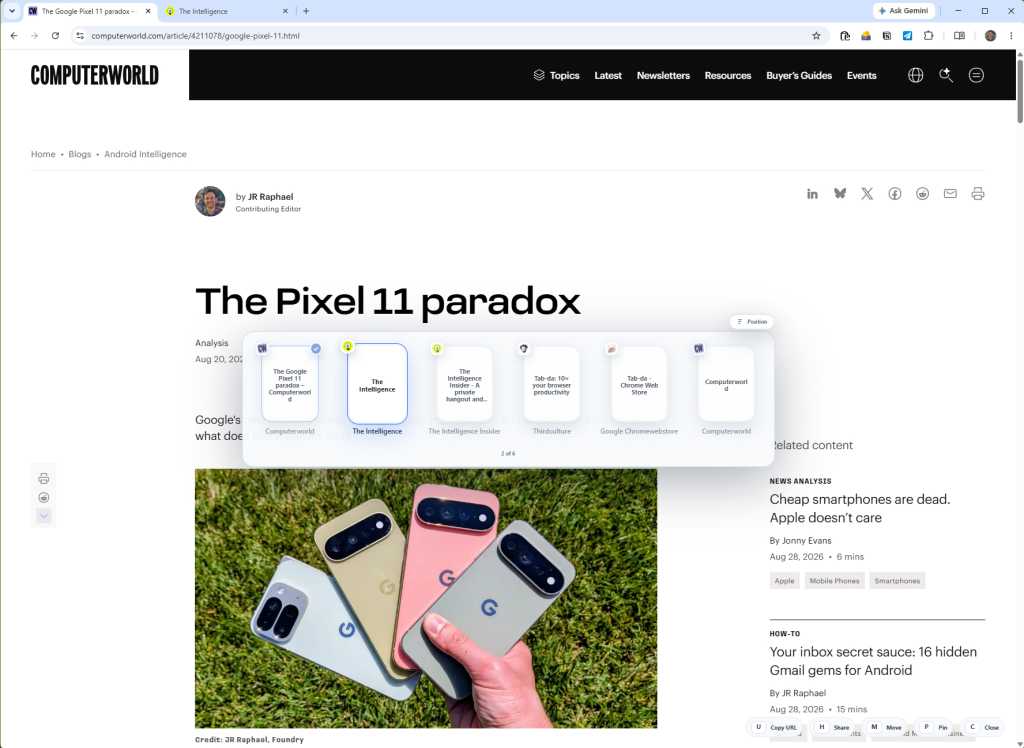
The most intuitive feature is the tab switcher, which replicates the familiar Alt-Tab experience found in Windows. By pressing Ctrl + Shift and the arrow keys, users can cycle through their open tabs in a clean, high-speed interface. This eliminates the need to squint at favicon-sized icons at the top of the browser, providing a clear, text-based list of active processes.
2. The Universal Command Bar
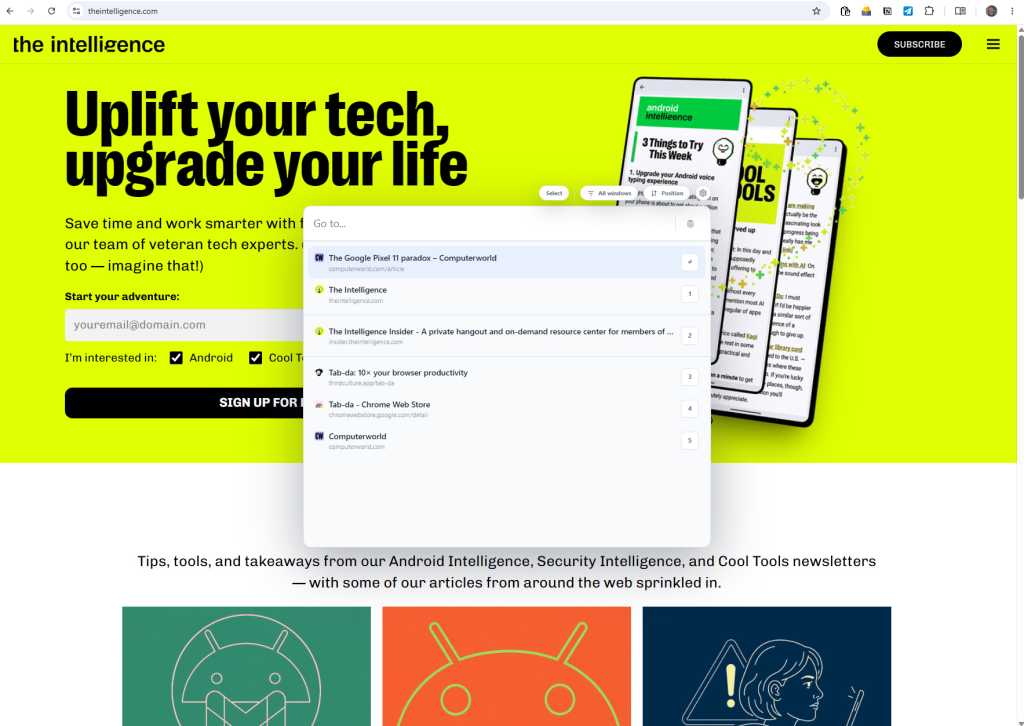
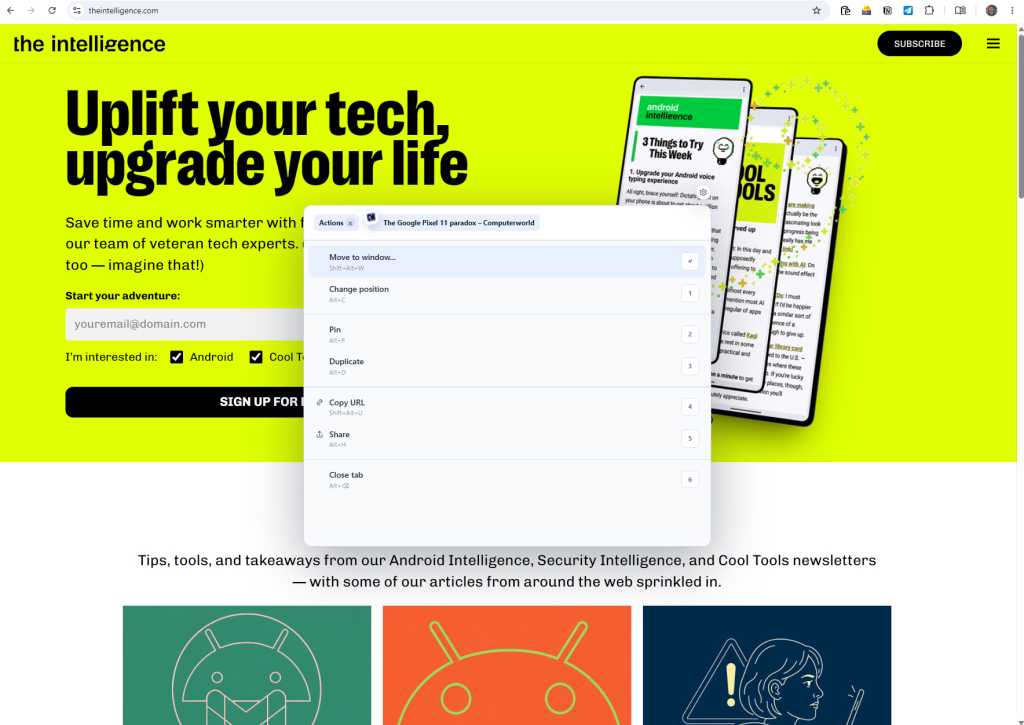
Summoned via Ctrl + Shift + Space, the command bar acts as the heart of the extension. Much like a Spotlight search for your browser, it allows users to:
- Search and switch to any open tab instantly.
- Execute browser actions (e.g., closing tabs, refreshing, or muting audio) without touching the menu bar.
- Navigate directly to specific web apps using intuitive keyword shortcuts.
3. Custom Workflows and Macro-Scripting
Perhaps the most potent feature is the ability to define custom "work modes." A professional can bundle four or five specific websites—such as a project management dashboard, a communication app, and a research database—into a single shortcut. A few keystrokes can trigger the simultaneous opening or activation of these sites, effectively allowing the user to "boot up" their workspace for specific projects in seconds.
Privacy and Ethics: A "Zero-Sync" Approach
In an era where "productivity tools" are often thinly veiled data-collection engines, Golriz has taken a firm, transparent stance on privacy. Tab-da operates on a strictly local basis. There is no cloud-syncing, no harvesting of browsing history for advertising profiles, and no telemetry sent to third-party servers. All data remains on the user’s device. This is a critical selling point for corporate professionals and privacy-conscious individuals who require robust tools without compromising their digital security.
Implications for the Future of Work
The rise of Tab-da signifies a broader shift in the tech industry: the "Professionalization of the Browser." As web applications become more complex, the browser itself must transition from a passive viewer to a proactive environment.
Implications for Workflow Efficiency
For the average user, the implication is a reclaimation of time. If a user can shave off just two seconds per navigation event and performs that action 100 times a day, they save over an hour of wasted movement per week. Over a year, that is nearly a full work week of reclaimed time.
The Developer Ecosystem
The success of third-party extensions like Tab-da also highlights a failure in current browser development. When tech giants focus on "feature creep"—adding AI chatbots or shopping assistants—they often ignore the basic ergonomics of the software. The popularity of independent tools serves as a signal to the industry that users are tired of "smarter" browsers; they want "faster" ones.
Adoption Strategy: The "Start Small" Methodology
Experts recommend a phased adoption strategy for those integrating Tab-da into their workflow. The learning curve of keyboard-first navigation can be steep for those accustomed to mouse-heavy browsing.
- Phase One: Master the Tab Switcher. Spend one week using only
Ctrl + Shift + Arrowsto navigate. - Phase Two: Integrate the Command Bar for site navigation.
- Phase Three: Build custom workspaces for recurring tasks.
Conclusion: A Small Price for Precision
Tab-da is currently available for a seven-day, no-strings-attached free trial, followed by a modest subscription fee (or a one-time lifetime license). In the context of professional tools, the cost is negligible compared to the time-saving benefits it offers.
As we move deeper into 2026, the competitive edge will not belong to those who can best prompt an AI, but to those who can manage their digital environment with the highest level of efficiency. Tools like Tab-da provide the scaffolding for this new, high-velocity era of work. By turning your browser into a command-center controlled by your own fingers, you stop being a passenger in your web experience and start acting as the pilot of your own digital workspace.
The keyboard is, and always has been, the fastest interface we have. It is time we started using it that way.